
Fly Delta
Delta Air Lines, Inc.Travel & Local
4.836.80K Reviews
- Version
- 7.17.2
- Installs
- 10.00M
- Age Rating
- Everyone
Screenshots



Our Review of Fly Delta
 Analysis by Appyee
I find Fly Delta most useful when a trip is already tied to Delta: it brings the details I need before and during travel into one place. It is free to download, so trying it does not require an app purchase. That is a clear cost advantage, though it should not be confused with free flights or free extras; the app is a travel-management tool, not a substitute for the fare or services a traveler chooses to buy.
Where the value comes from
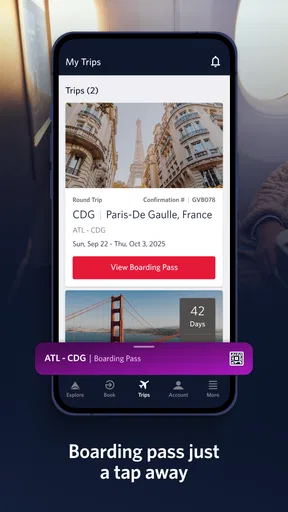
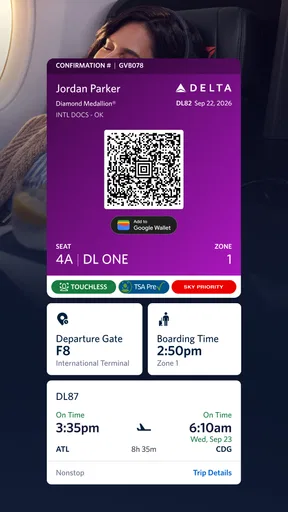
Its strongest value is practical rather than flashy. Having flight information and a boarding pass together can reduce the little bits of airport friction that add up on travel day. I would install it before leaving home, sign in, and check that the relevant trip appears while I still have time to sort out a login or itinerary issue. At the airport, that preparation matters more than exploring every menu.
For a simple round trip, I would use the app as a companion to the airline’s service, not as a reason to book a particular flight. If I am comparing schedules or fares across several airlines, a general travel search tool can make that comparison easier. Once I have chosen Delta, the airline’s own app is the more natural place to keep track of that Delta journey.
What it does well, and where I would be careful
The convenience has limits. An airline-specific app is most relevant when the trip is with that airline; it is less useful as a single hub for a holiday built around several carriers. I would not expect it to replace every travel tool I use, such as a broader itinerary organizer for reservations made in different places. Keeping a separate copy of important travel details is sensible, especially if I expect to be offline or have trouble accessing my account.
I also would not assume that every change can be handled without effort just because the app supports trip management. Travel plans can involve fare conditions and circumstances that need attention beyond tapping through a screen. My advice is to review the options shown for the specific booking and make sure a change is confirmed before relying on it. The app can make the process more convenient, but it cannot remove the rules attached to a ticket.
Who should install it
I would recommend it to someone who flies Delta and wants quick access to trip details rather than juggling paper and scattered messages. It is especially appealing for travelers who like checking their plans on a phone and prefer handling routine steps in one airline-specific place. If I were traveling with a companion, I would still make sure each person knows where their own boarding information is and that the person responsible for the booking can access the relevant account.
If I rarely fly Delta, or mainly want to compare multiple airlines, I would not keep this app just for general travel planning. A travel search service or a cross-airline itinerary app may fit that job better. The choice is not really between this app and every other travel app: it is between using Delta’s own tool for a Delta trip and relying on broader services for travel that spans providers.
A sensible way to use it
My preferred workflow is straightforward: install it before travel, sign in, confirm the trip is visible, and check the details again before heading to the airport. I would keep the boarding pass easy to reach and use the app to follow relevant flight information rather than repeatedly refreshing every screen. This small routine gives the app a clear job without making it the only place I depend on for the whole journey.
For a traveler who wants a no-cost download and is already flying Delta, the value is easy to understand: it puts useful airline information close at hand. For someone who wants a universal travel planner, its airline focus is a real limitation. I see it as a sensible companion, not an all-purpose travel solution.
Getting Started with Fly Delta
The first thing you’ll notice when you open the Fly Delta app is how clean and intuitive the interface is. Setting it up was a breeze. I just logged in with my SkyMiles account, and bam! All my past and upcoming trips were right there, neatly organized. The app is available for both Android and iOS, so no one’s left out.
Features That Stand Out
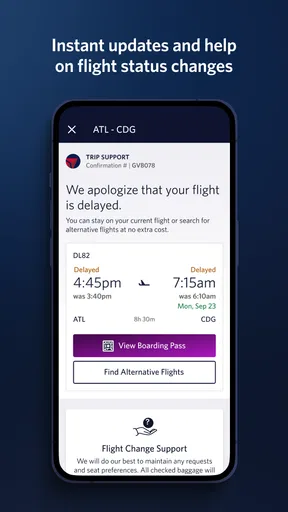
One of my favorite features has to be the real-time flight updates. I got notifications about gate changes, boarding times, and even baggage claim updates. It’s super handy, especially if you’re like me and tend to get a bit anxious about missing flights.
The app also allows you to check in for your flights directly. I loved being able to choose my seat and download my boarding pass without having to print anything. Plus, there’s an interactive airport map that’s a lifesaver when navigating unfamiliar terminals.
The most useful way I found to handle updates is to treat notifications as prompts to verify, not as a reason to stop paying attention to airport displays. A gate can change after I have looked at my phone, and the information around the terminal remains important. I would check the app while moving through the airport, then confirm the gate on the nearby screens before settling in. That habit uses the convenience without assuming that a phone alert is the final word.
For a tight connection, the map can be more valuable than it first appears. I would open it when I have enough time to orient myself, identify the route to the next gate, and avoid trying to work out the terminal layout while rushing. It is a practical aid, not a guarantee that a connection will be easy: walking distance, queues, and delays still shape the experience. If I am unfamiliar with the airport, I would use the map alongside signs and staff guidance rather than follow it blindly.
Booking and Managing Flights
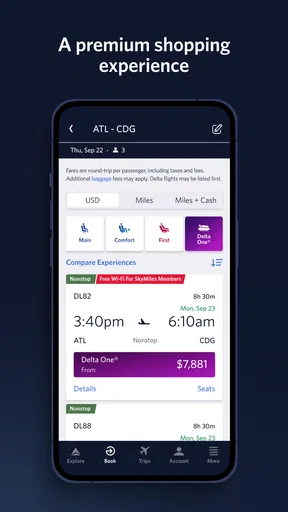
Booking flights through the app is straightforward. It’s as easy as pie to search for flights, compare prices, and book directly. You can even use your SkyMiles points if you’re looking to save some cash. Managing your bookings is a cinch too. I was able to make changes to my itinerary without breaking a sweat.
For choosing a flight, I would still compare the details that matter to my plans, not just the first convenient option shown. Departure times, connections, and the terms attached to a booking can affect whether a fare is actually a good fit. The app’s ability to manage a Delta reservation is useful once I know what I want, while a wider comparison tool may be more convenient when I have not settled on an airline.
A realistic use case is a work trip where the return flight needs to change after a meeting runs late. I would open the booking, review the available choices, and check the full implications before confirming anything. That is less stressful than beginning the search from scratch, but I would still pause to verify the revised itinerary and any relevant booking conditions. Convenience helps most when I take a moment to make sure the change is the one I intended.
Additional Perks
For those who love to travel in style, the app offers an easy way to upgrade your seats or purchase extra amenities. Plus, if you have any special requests like meals or baggage needs, you can handle it all within the app.
These options are useful when I already know what I want, but I would treat each as a choice to review rather than an automatic improvement. Before adding an extra or changing a seat, I would check what the screen says about that selection and its cost. The app brings the option closer to the booking; it does not mean every traveler needs an upgrade or add-on. Someone traveling light and happy with the existing arrangement may get more value by leaving those choices alone.
Another cool feature is the ability to track your bags. After a not-so-fun experience with lost luggage in the past, I found this feature to be a real game-changer. It’s reassuring to know exactly where your bags are at all times.
I see bag tracking as reassurance and a way to understand what is happening, not as a promise that luggage will arrive without a problem. If a bag is delayed, knowing its status can help me decide what to do next, but I would still follow the airline’s instructions and keep any useful travel details close by. For a trip with only carry-on luggage, this feature matters much less; for a checked bag, it can make the waiting feel more informed.
Security is another biggie for me, and I was pleased to see that the app uses fingerprint and facial recognition logins. It’s always nice to know your personal data is well-protected.
Biometric sign-in is convenient because it can make returning to an account less fiddly, especially when I am standing in line and need to check a trip. I still think of it as a way to access the app, not a reason to ignore basic account care. I would use a secure device lock, avoid leaving a logged-in phone unattended, and make sure I can access essential booking information if the app is not immediately available.
Fly Delta is a travel app from Delta Air Lines, Inc., and its focus is clear: it is built around the airline’s own journeys rather than every part of a traveler’s itinerary. It is free, rated for Everyone, and has an average score of 4.8 from around 473,000 ratings, with more than 10 million installs. Those figures suggest broad use, but they do not tell me whether it will suit a particular traveler; the key question is whether Delta is the airline they need to manage.
The app has been available since February 14, 2011, and its current version is 7.6.1, with Android 8.0 listed as the minimum operating system. I would check compatibility on the device I plan to travel with before relying on it. In everyday terms, the strongest reason to install it is having Delta trip information at hand; if I fly other airlines just as often, I would pair it with a broader travel organizer rather than expect one airline’s app to cover everything.
Final Thoughts
Overall, the Fly Delta app is a must-have for any Delta traveler. It makes managing flights a seamless experience and offers some great features that enhance the travel process. Whether you’re a frequent flier or just taking a quick trip, this app has you covered.
So next time you’re flying Delta, give the app a whirl. It might just make your travel experience a whole lot smoother. Safe travels!
Privacy and Permissions
See what permissions an app requests and how it handles your data.
- Calendar
- read calendar events plus confidential information, add or modify calendar events and send email to guests without owners' knowledge
- Location
- approximate location (network-based), precise location (GPS and network-based)
- Photos/Media/Files
- read the contents of your USB storage
- Storage
- read the contents of your USB storage
- Camera
- take pictures and videos
- Microphone
- record audio
- Wi-Fi connection information
- view Wi-Fi connections
- Other
- view network connections, pair with Bluetooth devices, access Bluetooth settings, full network access, run at startup, control vibration, prevent device from sleeping, read Google service configuration
Verdict
Strengths of Fly Delta
- Seamless booking and check-in process.
- Real-time flight status updates.
- Easy access to boarding passes.
- Personalized travel notifications.
- Integrated baggage tracking feature.
Limitations of Fly Delta
- Occasional app crashes reported.
- Limited offline functionality.
- Some features need internet access.
- In-app navigation can be confusing.
- Slow loading times during peak hours.
Similar Picks in This Category
View All
Google Maps
Google LLC3.4

Google Maps Go
Google LLC4.1

Booking.com: Hotels & Travel
Booking.com Hotels & Vacation Rentals4.8

Google Earth
Google LLC3.8

Skyscanner Flights Hotels Cars
Skyscanner Ltd4.8

trivago: Compare hotel prices
trivago N.V.4.4
Frequently Asked Questions
What features does the Fly Delta app offer?
The Fly Delta app provides a range of features to enhance your travel experience. You can book flights, check in, access your boarding pass, track your luggage, and receive real-time flight updates. Additionally, the app offers seat selection, trip management, and the ability to earn and use SkyMiles, making it a comprehensive travel companion.
Is the Fly Delta app available on both Android and iOS?
Yes, the Fly Delta app is available for both Android and iOS devices. You can download it from the Google Play Store for Android or the Apple App Store for iOS. The app is regularly updated to ensure compatibility with the latest operating systems and to introduce new features.
How does the Fly Delta app handle flight notifications and alerts?
The Fly Delta app sends real-time notifications and alerts to keep you informed about your flight status. You’ll receive updates on gate changes, boarding times, delays, and cancellations. This ensures you have the latest information at your fingertips, helping you manage your travel efficiently and reduce stress.
Can I manage multiple trips on the Fly Delta app?
Absolutely. The Fly Delta app allows you to manage multiple trips seamlessly. You can view your itinerary, add or modify bookings, and check flight details for all your upcoming trips. This feature is particularly useful for frequent travelers who need to keep track of various travel arrangements in one place.
Is it possible to earn and use SkyMiles through the Fly Delta app?
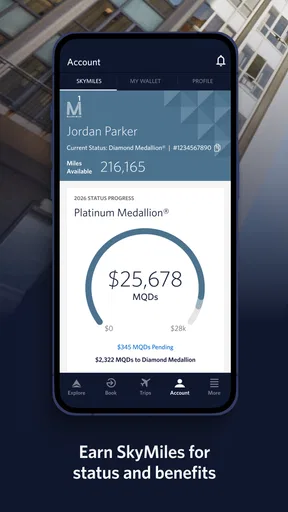
Yes, the Fly Delta app integrates seamlessly with the SkyMiles program. You can earn miles for flights booked through the app and use them for future travel rewards. The app also lets you track your SkyMiles balance and view your Medallion status, helping you maximize your benefits and rewards.
